Get a free audit
Hands holding a glass cube with a flower inside

A design system for your AI

We design and implement a design system for AI and your team, so content and code are created in your brand’s style. Saving tokens and team time.

Get a free audit

Less chaos. More brand.

Savings calculator

How much time you will save

Enter how many employees prepare documents, presentations and layouts with AI, and see how many hours a design system for AI will save them.

1

Savings

per year
112 h
per month
9 h
per week
2.3 h

Work speed

Work speed

With a design system, AI works 2–3 times faster

0 100% 200% 300%

100% With AI · regular speed 200–300% With AI and a design system

Design system contents

The full contents
of a design system for AI

Everyone has a logo, colors and fonts, but you can’t build a proposal, website or post from them. A brand identity won’t teach AI to create content.

5 of 41

Brand
identity

    41 of 41

    Design system for AI

    • Logo
    • Colors
    • Fonts
    • Icons
    • Graphic elements
    • Proposal
    • Contract
    • Invoices and acts
    • Report
    • Presentation
    • Tables
    • Social media post
    • Stories
    • Banners and ads
    • Leaflet and flyer
    • Landing page
    • Website
    • Packaging
    • Label
    • Price tag
    • Signage and wayfinding
    • Buttons and fields
    • Contact forms
    • Grid and spacing
    • Templates for AI
    • Mobile app
    • Personal account
    • Letterhead and letter
    • Email newsletter
    • Catalog
    • Price list
    • Tender bid
    • Guide and handout
    • Regulations and checklist
    • Certificate and diploma
    • Business card
    • Badge and pass
    • Menu
    • Branded clothing
    • Element states
    • Accessibility

    Brand identity Design system for AI
    What it is Basic visual rules of a brand. They answer the question “what does the brand look like”: logo, colors, fonts, icons and graphic elements. A ready-made kit for creating materials: components, templates, assembly rules and instructions for AI. It answers the question “how to build any material in the brand’s style”.
    What it consists of Five elements: logo, colors, fonts, icons, graphic elements. Usually packaged as a brandbook or a presentation. A brand identity plus components (buttons, fields, tables, grid), document and website templates, and a brand description for AI assistants.
    Who works with it A designer or someone who can read a brandbook and apply its rules by hand. Any employee and AI assistant: manager, marketer, accountant, developer, executive. A designer is only needed for new tasks.
    What you can make A business card, presentation or banner, if there’s a designer nearby who will build them by the rules. Invoices, proposals, websites, posts and hundreds of other materials at once, without a separate layout for each.
    How it works with AI AI knows the logo and colors, but doesn’t know how to build an invoice or a page. You have to explain the style every time and fix the result. AI gets the rules and templates and builds the material itself: no long explanations or repeated fixes.
    Work speed From 17 to 28 hours, including handing the document over to a designer. About 50 minutes from idea to finished document.
    Consistent look Depends on who makes the material: different people produce different versions. All materials are built from the same parts, so they look the same no matter which employee makes them.
    Updating materials A new material almost always needs a new layout. A rule change has to be made by hand in every file. New materials are built from ready-made parts. One edit in one place updates all templates, and the system grows with the company.
    Bottom line Shows what the brand looks like. Lets any employee and AI create materials in the brand’s style.
    1. What it is

      Brand identity

      Basic visual rules of a brand. They answer the question “what does the brand look like”: logo, colors, fonts, icons and graphic elements.

      Design system for AI

      A ready-made kit for creating materials: components, templates, assembly rules and instructions for AI. It answers the question “how to build any material in the brand’s style”.

    2. What it consists of

      Brand identity

      Five elements: logo, colors, fonts, icons, graphic elements. Usually packaged as a brandbook or a presentation.

      Design system for AI

      A brand identity plus components (buttons, fields, tables, grid), document and website templates, and a brand description for AI assistants.

    3. Who works with it

      Brand identity

      A designer or someone who can read a brandbook and apply its rules by hand.

      Design system for AI

      Any employee and AI assistant: manager, marketer, accountant, developer, executive. A designer is only needed for new tasks.

    4. What you can make

      Brand identity

      A business card, presentation or banner, if there’s a designer nearby who will build them by the rules.

      Design system for AI

      Invoices, proposals, websites, posts and hundreds of other materials at once, without a separate layout for each.

    5. How it works with AI

      Brand identity

      AI knows the logo and colors, but doesn’t know how to build an invoice or a page. You have to explain the style every time and fix the result.

      Design system for AI

      AI gets the rules and templates and builds the material itself: no long explanations or repeated fixes.

    6. Work speed

      Brand identity

      From 17 to 28 hours, including handing the document over to a designer.

      Design system for AI

      About 50 minutes from idea to finished document.

    7. Consistent look

      Brand identity

      Depends on who makes the material: different people produce different versions.

      Design system for AI

      All materials are built from the same parts, so they look the same no matter which employee makes them.

    8. Updating materials

      Brand identity

      A new material almost always needs a new layout. A rule change has to be made by hand in every file.

      Design system for AI

      New materials are built from ready-made parts. One edit in one place updates all templates, and the system grows with the company.

    9. Bottom line

      Brand identity

      Shows what the brand looks like.

      Design system for AI

      Lets any employee and AI create materials in the brand’s style.

    1 / 9

    Retail

    A chain of stores with many locations, suppliers and promotions. Price tags, catalogs and navigation must look the same in every store and launch fast. The design system takes over the routine while the team focuses on assortment and sales.

    • Price tag and shelf talker
    • Shelf planogram
    • Promo catalog
    • Loyalty program mailing
    • Sales floor navigation
    • Staff uniform
    • Supplier contract
    • Sales report by store
    • In-store promo banner
    • Mailbox flyer
    • New arrivals post and stories
    • Packaging and bags
    • Loyalty mobile app
    • Customer account
    • Cashier instructions
    • Employee badge
    • Gift card
    • Franchisee price list
    • Landlord presentation
    • Sale mailing
    • Store operating rules
    • Website banner
    • Product label

    Shop

    A small shop where there’s usually no design budget or dedicated person. You need price tags, packaging, promotions and social media, and you have to do it all yourself. A ready-made system lets you look like a big brand without a permanent designer.

    • Price tags and labels
    • Shop window banner
    • Gift certificate
    • Branded packaging
    • Product catalog
    • Promo post and stories
    • Receipt and bill
    • Owner’s business card
    • Promo flyer
    • Customer mailing
    • Price list
    • Shop website
    • Shop sign
    • Loyalty card
    • Discount card
    • Social media banner
    • Order form
    • New arrival story
    • Supplier contract
    • Sales report
    • Product care instructions

    Trading company

    Wholesale and B2B trade: lots of correspondence, proposals and documents for buyers. Clients judge reliability by how neat the proposals, price lists and contracts are. A consistent look helps win tenders and saves managers’ time.

    • Commercial proposal
    • Price list
    • Contract specification
    • Tender bid
    • Invoice and delivery note
    • Product catalog
    • Presentation for buyers
    • Supply contract
    • Reconciliation statement
    • Letter to a partner
    • Dealer certificate
    • Product packaging and labeling
    • New arrivals mailing to dealers
    • Website and landing page
    • Manager’s business card
    • Price change notice
    • Company presentation
    • Shipment request
    • Sales report
    • Ordering instructions
    • Partner promotion

    Accounting firm

    Services where trust is built on accuracy and order. Contracts, acts, reports and client letters must look strict and uniform. A design system removes manual formatting and speeds up document preparation.

    • Service agreement
    • Certificate of completion
    • Service rates
    • Client report
    • Reporting deadlines memo
    • Letter to a client
    • Mailing on legal changes
    • Outsourcing proposal
    • Client document checklist
    • Services presentation
    • Accountant certificate
    • Client account
    • Company website
    • Specialist’s business card
    • Invoice for payment
    • Tax burden report
    • Application form
    • Portal usage instructions
    • New requirements post
    • Rates flyer

    Banking and finance

    A regulated industry with many documents, products and channels: branches, app, website and mailings. A consistent look builds trust and reduces the risk of formatting errors. The system helps launch new products faster.

    • Product terms and rates
    • Contract and appendices
    • Statement and client notification
    • Investor presentation
    • App instructions
    • Shareholder report
    • Client account
    • Bank mobile app
    • Operations regulations
    • Client mailing
    • Product flyer
    • Campaign banner
    • Brochure for depositors
    • Application form
    • Branch navigation
    • Employee badge
    • Deposit agreement
    • Product presentation
    • New product post
    • Campaign stories
    • Product landing page
    • Partner certificate

    Real estate

    Deals, property presentations and advertising across different platforms. Every property needs its own materials, and appearance affects buyer trust. The system lets you assemble presentations, catalogs and landing pages from ready-made parts.

    • Property presentation
    • Property valuation
    • Sale and lease agreement
    • Property catalog
    • On-site sign and banner
    • New development flyer
    • Residential complex landing page
    • Developer’s offer
    • Handover certificate
    • Floor plan brochure
    • Mailing to buyer database
    • New property post
    • Realtor’s business card
    • Accreditation certificate
    • Sales office navigation
    • Apartment price list
    • Property report
    • Walkthrough stories
    • Buyer instructions
    • Viewing request form
    • Banner for listing platforms

    Food service

    Menus, promotions, packaging and social media change often, sometimes weekly. A guest should recognize the venue by any material: from a cup to a poster. A design system speeds up launching promotions and seasonal offers.

    • Menu
    • Dish card and price tag
    • Staff uniform
    • Packaging and cups
    • Gift card
    • Promo poster and post
    • Signage and directions
    • New item story
    • Deal of the day
    • Loyalty card
    • Guest mailing
    • Event invitation
    • Receipt and bill
    • Restaurant website
    • Delivery flyer
    • Delivery menu
    • Banquet menu price list
    • Dinner gift certificate
    • Shift opening checklist
    • Waiter badge
    • Seasonal menu post

    Healthcare

    A clinic’s documents must be clear, strict and trustworthy: price lists, consent forms, leaflets, certificates. Patients judge quality by how neat the materials are. A consistent look simplifies the work of administrators and doctors.

    • Service price list
    • Informed consent
    • Patient leaflet
    • Referral and certificate
    • Doctors’ certificates
    • Clinic navigation
    • Patient account
    • Service agreement
    • Appointment mailing
    • Procedure brochure
    • Doctor’s badge
    • Clinic mobile app
    • Health post
    • Clinic website
    • Staff uniform
    • Check-up program
    • Payment certificate
    • Reminder mailing
    • Promo banner
    • Doctor story
    • Appointment rules

    Beauty and services

    A business where clients choose with their eyes: social media, price lists, gift certificates, packaging. You need beautiful materials you can make quickly yourself. The system lets a specialist or administrator put together what they need in minutes.

    • Service price list
    • Gift certificate
    • Membership and client card
    • “Before and after” post
    • Specialist uniform
    • Booking confirmation
    • Branded packaging
    • Promo stories
    • Service menu
    • Specialist’s business card
    • Salon flyer
    • Discount mailing
    • Website and online booking
    • Salon sign
    • Service catalog
    • Service agreement
    • Specialist badge
    • Promo banner
    • Care instructions
    • Receipt and bill

    Education

    Courses, programs, contracts, certificates, mailings and a student account. Materials are needed constantly: for every intake, group and event. A consistent look builds trust in the program and saves instructional designers’ time.

    • Course program
    • Tuition agreement
    • Certificate and diploma
    • Class schedule
    • Course presentation
    • Student mailing
    • Student account
    • Learning materials
    • Participant badge
    • Enrollment post
    • Course landing page
    • Mobile app
    • Certificate and order
    • Progress report
    • Open day invitation
    • Exam schedule
    • Course regulations
    • Enrollment banner
    • Instructor story
    • Program catalog
    • Professional development certificate

    Manufacturing

    Technical documentation, labels, packaging, catalogs and tender bids. Accuracy and compliance with standards matter here, and appearance shows the company’s level. The system simplifies preparing documents for partners and tenders.

    • Technical conditions and specification
    • Quality certificate
    • Label and marking
    • Product packaging
    • Product catalog
    • Safety instructions
    • Production regulations
    • Tender bid
    • Supply contract
    • Commercial proposal
    • Factory presentation
    • Output report
    • Certificate of conformity
    • Uniforms and badges
    • Workshop navigation
    • Company website
    • Tax invoice
    • Product price list
    • Operating manual
    • Company brochure
    • Partner mailing
    • Trade show banner

    IT and services

    Product, website, documentation, contracts, project estimates and marketing: lots of materials, and they change fast. A consistent look shows the company’s maturity and speeds up preparing proposals. The system connects design, code and documents.

    • Project estimate
    • Technical specification
    • Contract and SLA
    • Product presentation
    • Product landing page
    • Client account
    • Documentation and instructions
    • Project report
    • Commercial proposal
    • Roadmap
    • Release mailing
    • Post and stories
    • Partner certificate
    • Product interface
    • Mobile app
    • Conference banner
    • Pricing plan description
    • Investor presentation
    • Service agreement
    • Invoice and acceptance certificate
    • Requirements document
    • Company website
    • Employee business card
    • Client case study

    Integrations

    Integration
    with any systems

    An AI assistant makes everything simple: describe the task in words and get a finished document in your brand style. Instantly, with no designer and no waiting.

    12+ AI assistants

    • Claude
    • ChatGPT
    • Grok
    • DeepSeek
    • Cursor
    • Meta AI
    • Gemini
    • Copilot
    • Perplexity
    • Mistral
    • Qwen
    • Kimi

    What you get

    What implementing a design system for AI gives you

    • 01 / 04

      Speed

      A manager or AI assembles a document in minutes.

    Process

    How we work

    Four steps from chaos to a system.

    01 / 05

    We run a requirements audit

    Free · up to a week

    We gather your requirements and study your brand identity and how you currently work with documents.

    Get an audit

    02 / 05

    We draw up a document list

    You approve the list

    We identify the documents, tables, pages, forms and other elements that must be in your style. These are what the design system for AI will cover.

    03 / 05

    We prepare templates

    Delivered every day

    We build the components and templates for the documents you need. You review the result and tell us what to adjust.

    04 / 05

    We implement and launch

    1–3 months alongside your team

    We launch the system in one department and help employees get used to it. Then we connect the other departments and AI assistants.

    05 / 05

    Result

    Document in minutes

    A manager or AI fills in the text and numbers, and the document is ready without a designer.

    Why us

    Why us,
    not a freelancer

    Hover over a card to see how we solve it.

    Case studies

    How we change processes

    What clients had and what they got.

    Public Fintech startup

    Duration 3 weeks

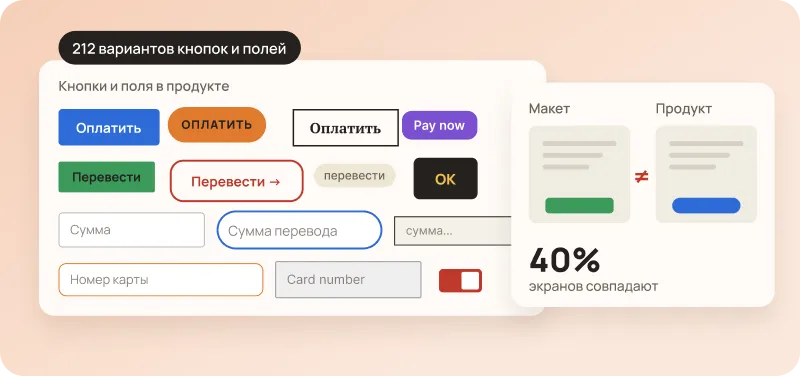
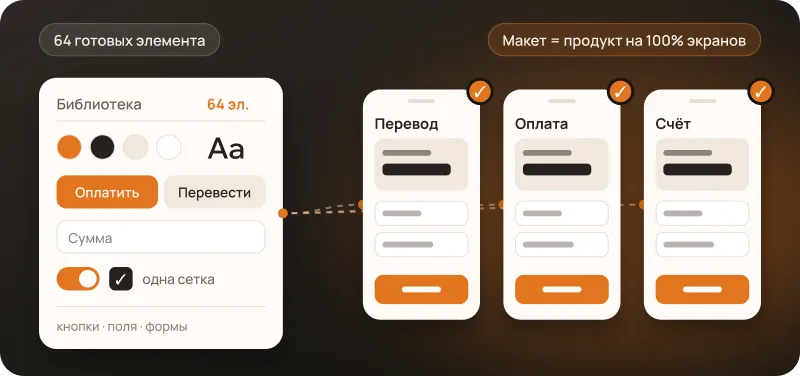
    The app had 212 different buttons and fields, though 12 would have been enough. Designs and the product matched on only 40% of screens.

    Now there are just 64 ready-made elements, identical in designs and in the product. A new screen is built in a day, and features ship every week.

    −45%
    of time per new screen
    3 weeks
    until the first release
    212 → 64
    UI elements

    We cut 212 button and field variants down to 64 ready-made elements

    NDA Telecom operator, 3 brands

    Duration 6 weeks

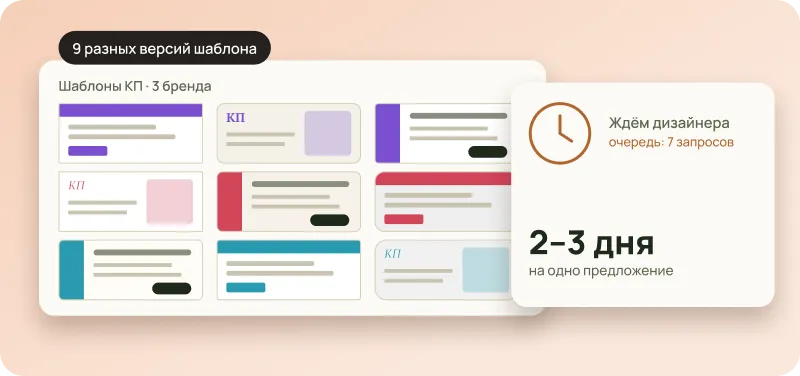
    Managers waited 2–3 days for a designer to get a commercial proposal. Three brands had nine different template versions.

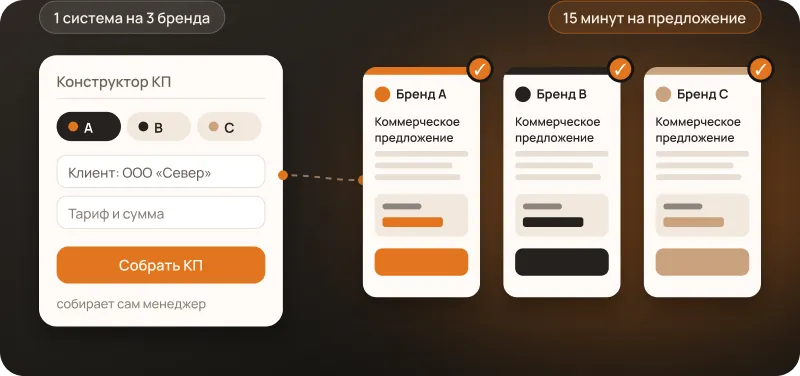
    A manager builds a proposal in the brand style on their own in 15 minutes. 120 employees make documents without a designer.

    15 minutes
    per proposal instead of 2 days
    120
    employees make documents themselves
    9 → 1
    template versions for three brands

    We replaced nine template versions with a single system for three brands

    NDA A top-10 bank in Eastern Europe, 6 products

    Duration 4 months

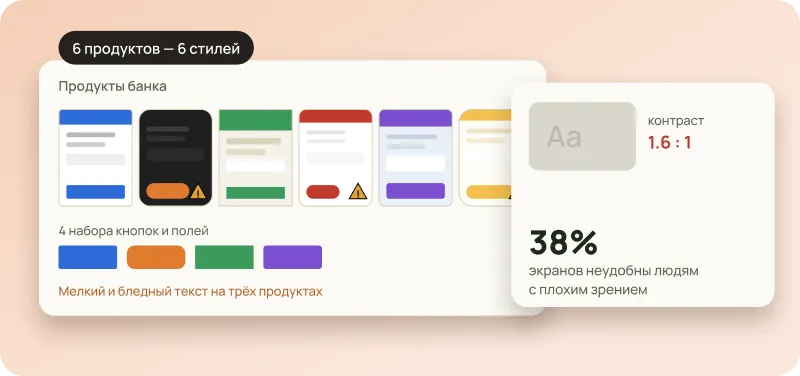
    Six products, and each looked its own way: four sets of buttons and fields didn’t fit together. 38% of screens were hard to use for people with low vision.

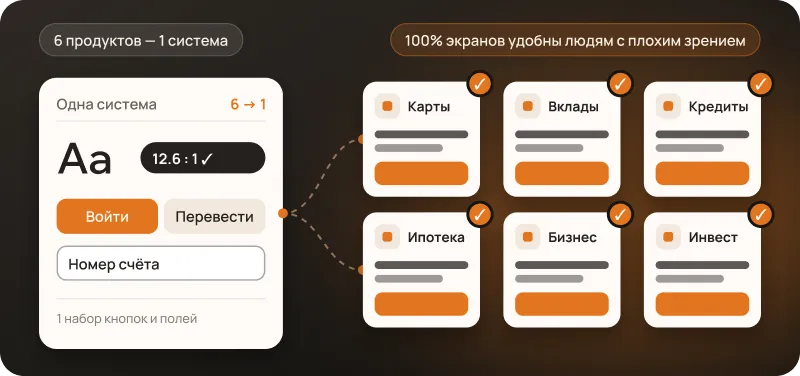
    One shared system instead of six. A new product launches on a ready-made foundation, and all screens are accessible to people with low vision.

    6 → 1
    system instead of six
    100%
    of screens are accessible to people with low vision
    4 → 1
    set of buttons and fields

    We merged six interfaces into one accessible system

    Price and audit

    Development and supportof a design system

    Audit FREE

    We’ll go through your documents, website and product and show what to fix first.

    Included ✓

    Support plans

    Choose how much help you need per month: from spot fixes to full system support. You can change the plan monthly.

    Support package

    Team workshop FREE

    We’ll show employees how to use the system and answer their questions.

    Included ✓

    When do you want to start

    How to reach you

    One method is enough: email, Telegram or phone.

    FAQ

    Frequently asked questions

    • A brandbook describes the style, while the system turns it into ready-made templates from which documents are assembled in minutes, including with AI.

    • The audit is free. The amounts in the “Price and audit” form are approximate: they’re an estimate based on your answers. After the audit we fix the exact price and timeline in the contract. Support after launch: 4 hours a month for $99.

    • The free audit takes up to a week. After that we deliver ready-made templates and elements every day, and support the rollout for 1–3 months. You’ll get exact timelines after the audit.

    • Yes. We start with the free audit and the first stage, launching one department first and then the rest. You accept each stage separately and pay for the accepted stages.

    • The audit commits you to nothing. Stages are accepted separately, so you can stop after any of them, and only accepted ones are paid for.

    • The calculator on the page gives a benchmark: it counts the freed-up hours assuming the system reduces repetitive work by about 28%. You’ll get the exact picture for your company (problems, plan and price) after the free audit.

    • You do. All rights to files, code and templates are transferred under the contract: a master agreement and an appendix for each stage.

    • We only prepare visual templates: we need no access to commercial information, personal data or your systems. We sign an NDA before the audit starts (if you don’t have a template, we’ll send ours). If needed, everything is deployed inside your network.

    • About 3 hours a week from one or two people: review the result and answer questions. After that employees simply assemble documents from templates.

    • No. We handle the setup, a newcomer learns the rules in a day, and training is part of the project.

    • You describe the task in words, the assistant fills the text and numbers into the template, and a branded document is ready in minutes, with no designer and no waiting.

    • With Claude, ChatGPT, Gemini, Copilot, Perplexity, Cursor, Grok, DeepSeek, Mistral, Qwen, Kimi and Meta AI. You’re not tied to a single service.

    • A brandbook and examples of your documents, 2–3 short meetings during the audit and 2–3 employees for testing. No client or business data needed.

    • For everything that needs a brand style: websites, proposals, contracts, reports, presentations, forms, price tags, labels and more. We draw up the list together during the audit.

    • You can order a new template later under the “Support on request” plan.

    • Colors, fonts and spacing are already set in the templates, so you never need to approve the look each time.

    • React, Vue or universal web components that work everywhere.

    • In your Figma and your repository.

    • Only the brand description and templates. Client and business data isn’t passed to the assistant.

    • Yes. Everything is deployed inside your network, with a local model if needed.

    • The brand description is stored separately, and a new tool connects to the same description.

    • We migrate them gradually, starting with the most important. The product works as usual during the transition.

    • We fill in your questionnaire. We have a ready package: access, data storage, list of subcontractors.

    • Yes. We build in contrast, sizes, element states and keyboard navigation from the start, following the WCAG standard. A separate accessibility audit is available as an optional extra.